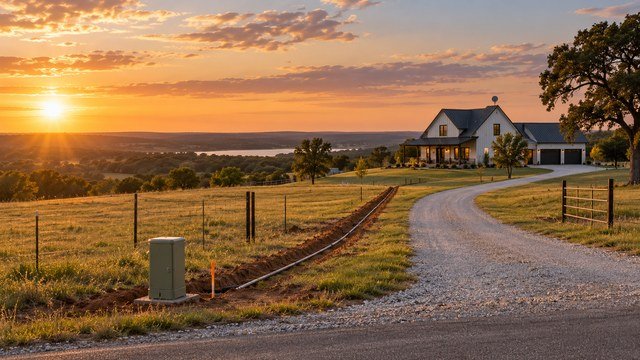
Internet service should be verified before you buy the land
Rural internet availability can change from one road, driveway, or address point to the next.
A property listing may say broadband is available nearby while the actual homesite still requires a long drop, wireless line of sight, satellite service, or a new construction request.
If internet matters for work, school, streaming, security cameras, or smart-home systems, verify serviceability before closing rather than assuming a nearby provider can serve the parcel.
Start with both the Oklahoma Broadband Map and the FCC National Broadband Map
The Oklahoma Broadband Office provides an interactive state map that lets users search addresses, view reported service status, distinguish technologies, review reported speeds, and see approved expansion projects.
The FCC National Broadband Map shows provider-reported availability by location and is the federal map used for broadband availability decisions.
Use both as screening tools, then confirm directly with providers.
Maps are useful, but they are not the final serviceability answer
The FCC map displays availability as reported by internet service providers.
That does not guarantee a provider can activate service at the exact future house location without additional construction.
For acreage with a long driveway or undeveloped homesite, ask the provider to perform a serviceability check using the actual parcel and proposed structure location.
The FCC map shows technology as well as advertised speed
For a selected address, the FCC map can show providers, technologies, and maximum advertised download and upload speeds reported as available.
That makes it useful for distinguishing fiber, cable, DSL, fixed wireless, and satellite options.
The map does not by itself tell you real-world performance, total installation cost, data policies, latency, or whether the provider will extend facilities deep into an undeveloped tract.
Fiber is usually the strongest long-term option when it is truly available
Fiber-to-the-premises can provide high download and upload capacity, low latency, and strong reliability for remote work, cloud backups, large file transfers, cameras, and multiple users.
The difficult part on acreage is confirming that fiber reaches your actual serviceable location rather than only the public road or a nearby address.
Ask whether the quoted service includes the full drop to the house and what happens when the house is hundreds or thousands of feet from the road.
A fiber line at the road does not necessarily mean a free installation
Providers often have standard installation allowances and different rules for long private drives, road crossings, conduit, trenching, or construction beyond their normal service distance.
A rural owner may be responsible for part of the trench, conduit, boring, or excess drop cost.
Get the construction policy in writing before assuming that a provider shown on the map means a low-cost hookup.
Ask whether the provider needs an established address first
Undeveloped acreage can be difficult to qualify in automated ordering systems because the future house may not yet have a recognized service address.
The provider may need a county-issued address, 911 address, building permit, meter location, or other proof of the service point before creating an installation order.
Ask what documentation is needed before construction reaches the utility stage.
Fixed wireless can be excellent when line of sight is good
Fixed wireless providers use a radio link between a tower or network site and equipment mounted at the customer's property.
This can deliver strong rural service without running miles of new cable, but performance depends heavily on tower distance, terrain, trees, structures, spectrum, and network design.
A mapped coverage area should be followed by an actual signal or line-of-sight evaluation whenever possible.
Trees and terrain can make or break fixed wireless
Oklahoma's open plains can be favorable for wireless links, while wooded Cross Timbers, creek bottoms, ridges, and heavy cedar can obstruct signal paths.
A house tucked behind a hill or dense tree line may perform very differently from a nearby home on higher ground.
Ask where the outdoor radio or antenna would be mounted and whether a mast or tower would be required.
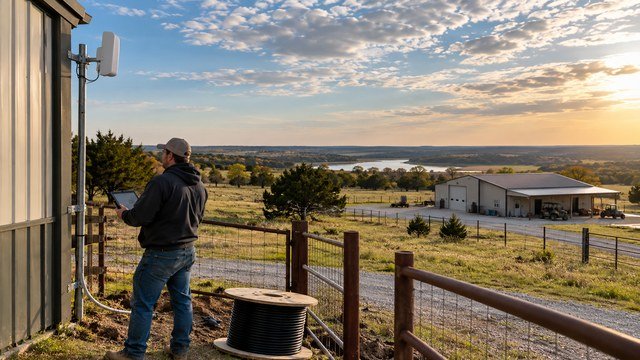
Do not clear trees for internet until the installer confirms the path
A buyer may assume that removing a few trees will solve a fixed-wireless problem, but the actual obstruction could be terrain or a different part of the path.
Have the provider identify the serving tower and recommended equipment location first.
If vegetation management is needed, coordinate it with the home's broader clearing and site plan.
Satellite internet can work almost anywhere with a clear view of the sky
Low-earth-orbit satellite systems have made satellite internet far more practical for many rural properties than older geostationary options.
They can be especially valuable where terrestrial broadband has not reached the road.
The main site-planning issue is giving the terminal a clear sky view while protecting the cable run and mounting location from trees, roofs, equipment, and future construction.
Satellite should still be evaluated for real household demand
A satellite connection can be a strong primary or backup option, but performance, pricing, data policies, and network congestion can change over time.
Remote workers should consider video calls, VPN behavior, upload demand, large cloud transfers, and latency-sensitive applications rather than looking only at advertised download speed.
Verify current terms directly with the provider before relying on it for a purchase decision.
Cellular home internet can be surprisingly useful in some rural areas
Where a property has strong 4G or 5G coverage, cellular home internet can provide an easy installation and useful backup connection.
The limitation is that coverage maps do not guarantee strong indoor signal or stable capacity at the homesite.
Test multiple carriers on the property at different times of day before treating cellular service as the primary plan.
Phone bars are not enough to evaluate cellular internet
A phone can show usable signal while home-internet equipment performs differently because of tower load, frequency bands, antenna position, and plan restrictions.
Run real speed and latency tests outside and inside the likely house area using the carriers you are considering.
If possible, test during evening peak hours as well as midday.
DSL can still appear on rural availability maps
Some Oklahoma rural areas still have copper-based DSL service.
It can provide basic connectivity where no better wired option exists, but achievable speed often depends on copper quality and distance from provider equipment.
If DSL is the only wired option, ask for the speed tier actually available at the exact address rather than relying on a general coverage claim.
Cable service may stop at the edge of town or subdivision
Cable internet can offer strong speeds, but rural buildouts often end where density falls.
A parcel close to existing cable plant may still face construction charges if the drop exceeds the provider's normal length or requires road boring.
Ask whether the provider will extend plant, not merely whether the street appears inside its service territory.
New construction orders require more lead time than normal installs
An existing house with a service drop is easy for a provider to qualify.
A new rural build may require engineering, easement review, pole work, trenching, conduit, road crossings, or new network construction.
Begin provider conversations early enough that broadband does not become the last utility delaying move-in.
Coordinate internet conduit with the driveway and utility trench plan
If the future house sits far from the road, it can be inexpensive to install spare conduit while the driveway or utility trench is already open compared with excavating later.
The internet provider may have specifications for conduit size, sweep radius, pull boxes, depth, tracer wire, and where its facilities can share or cross other utilities.
Get provider requirements before buying conduit or burying it.
Do not assume internet can share the electric trench
Electric utilities and communications providers have separation and conduit rules that vary by installation.
Sometimes joint trenching is possible with required spacing; other times separate routes are needed.
Coordinate both companies before excavation rather than having one contractor make assumptions that the other provider rejects.
Install spare conduit under concrete and major road crossings
Driveways, patios, retaining walls, and paved areas are expensive to reopen.
Where future communications lines may cross them, sleeves or spare conduit can preserve options for fiber, gate controls, cameras, intercoms, or a second provider.
Label both ends and record their locations before backfilling.
A gate can become part of the internet design
Long rural driveways often include powered gates, cameras, keypads, call boxes, or license-plate cameras far from the house.
Those systems may need fiber, Ethernet extenders, wireless bridges, or cellular connectivity.
Plan gate communications at the same time as gate power and driveway construction.
Security cameras can consume significant upload bandwidth
Cloud-connected cameras do not only download video; they can continuously upload event clips or live streams.
Multiple high-resolution cameras, especially at a shop, barn, gate, and house, can expose weak upload capacity quickly.
Include security and cloud-backup demand when comparing rural internet options.
Remote work depends on latency and upload as well as download speed
Video conferencing, VPN connections, remote desktop, voice calls, and cloud collaboration can feel poor even when a speed test shows a large download number.
Latency, packet loss, jitter, and upload performance matter heavily for interactive work.
If the household depends on remote employment, test the actual applications you use before relying on a provider long term.
A second connection can be worth more than a faster single plan
Rural properties can experience outages from storms, fiber cuts, tower failures, power interruptions, or equipment problems.
A primary fiber or fixed-wireless connection paired with cellular or satellite backup can keep work and security systems online.
For households that cannot afford downtime, redundancy should be part of the utility budget.
Backup internet also needs backup power
A second internet connection does not help if the router, modem, optical network terminal, wireless radio, or satellite terminal loses power during an outage.
Use a UPS for networking equipment and connect critical gear to the home's generator or battery backup where appropriate.
Ask whether the provider's outside network also has backup power during extended outages.
Mesh Wi-Fi does not solve a weak internet connection
Acreage owners sometimes confuse internet service with Wi-Fi coverage.
Mesh systems can improve wireless coverage inside a large home or between nearby structures, but they cannot fix an inadequate broadband connection coming into the property.
Separate the problem into two layers: internet backhaul to the property and local networking around the buildings.
Detached shops often need a dedicated network link
A shop 100 to 500 feet from the house may be too far for ordinary indoor Wi-Fi.
Buried fiber between buildings is often a robust option because it avoids electrical grounding differences and provides high capacity, while point-to-point wireless bridges can work where trenching is impractical.
Plan this before the shop slab and landscaping are complete.
Fiber between buildings can be a smart private-network choice
Even if the internet provider enters only at the house, the owner can extend the local network to a shop, guest house, barn office, or gate using private fiber.
Use outdoor-rated cable, proper conduit, and networking equipment designed for the distance and environment.
This is separate from the provider's public network and should be designed as part of the property's low-voltage plan.
Internet service can affect where you place the house
If fixed wireless is the only realistic terrestrial option, a higher or more open homesite may have a much better signal path than a low wooded location.
If fiber is at the road, a homesite near the frontage may reduce construction length compared with building half a mile back.
Broadband should not control the entire property design, but it deserves consideration alongside power, driveway, septic, water, and drainage.
The cheapest homesite can become expensive if every utility run is long
A deep homesite may create long runs for electric, water, propane, broadband, gates, and driveway construction all at once.
Internet construction may be a smaller line item than power, but it is another reason to compare total infrastructure cost between potential building locations.
A site plan should optimize all utilities together instead of choosing the house location first and pricing connections later.
Ask providers about construction charges in writing
Phone representatives may confirm that service is 'available' without explaining excess footage, trenching, road bores, pole replacements, or network-extension fees.
Request a site survey or construction estimate when the parcel is undeveloped or the house will be far from existing facilities.
Save the quote and any assumptions about the service point.
Ask whether the quoted speed is symmetrical
Some technologies advertise much higher download than upload speeds.
Fiber plans are often capable of strong upload performance, but plan structures vary by provider.
For remote work, content creation, cloud backups, large photo or video uploads, and security systems, compare upload speed explicitly.
Data caps and deprioritization can matter on rural connections
Some wireless or satellite plans may include data thresholds, network-management policies, priority tiers, or reduced performance during congestion.
A household streaming 4K video, backing up computers, running cameras, gaming, and working remotely can consume substantial data.
Review current plan terms rather than assuming every 'unlimited' plan behaves the same under heavy use.
The FCC map can be challenged when reported availability is wrong
If the FCC National Broadband Map shows a provider or service that is not actually available at the location, consumers can submit an availability challenge.
The FCC's process lets the user select the provider and technology, choose a challenge reason, and submit supporting details or documentation.
If the provider concedes or the FCC resolves the challenge in the consumer's favor, the reported availability is updated.
A missing or incorrect location can also be challenged
New rural homesites and unusual addresses may have mapping issues separate from provider availability.
The FCC also provides a location-challenge process for correcting information about broadband-serviceable locations.
This can matter when the house or structure is missing or represented incorrectly on the map.
The Oklahoma map can show expansion activity
The Oklahoma Broadband Map includes approved expansion projects as well as current service information.
That can help buyers understand whether infrastructure improvements are planned nearby.
However, do not buy property based solely on a future project unless you verify the project's actual service area, construction status, timing, and provider obligations.
Future broadband grants are not a guaranteed connection date
Government-funded infrastructure programs can take years from award through engineering, permitting, construction, and activation.
Project boundaries can also exclude individual roads or structures.
Treat planned broadband as a possible future benefit, while making sure the property has an acceptable internet solution on the day you need it.
Test internet during the inspection period when possible
If the property already has a house, ask the seller for the provider name and current plan, then run your own speed and latency tests.
Test over a wired Ethernet connection if possible so weak indoor Wi-Fi does not distort the result.
For raw land, bring phones from multiple carriers and request provider site surveys during the due-diligence window.
Do not rely on a seller's old speed test
Provider networks, plans, equipment, congestion, and household usage change over time.
A screenshot from months ago also may not show whether the test used Wi-Fi or Ethernet or whether it was taken during peak hours.
Current serviceability confirmation from the provider is stronger evidence than a listing comment or historical test result.
Questions to ask an internet provider before closing
A useful serviceability conversation should go beyond 'Do you serve this ZIP code?'
- Can you serve this exact parcel or future service address?
- What technology will serve it?
- What download and upload speeds are available?
- Is the speed symmetrical?
- Where is the nearest existing network facility?
- Is the house location within the standard installation distance?
- What excess construction charges could apply?
- Will I need to provide trench or conduit?
- What conduit specifications do you require?
- Can you cross the driveway or county road if needed?
- How long does a new-construction order usually take?
- Are there data caps or priority limits?
- Is there a contract or equipment fee?
- Do you provide static IP service if needed?
- What happens during a power outage?
Questions to answer before buying rural Oklahoma land
Internet due diligence should end with a workable primary and backup plan.
- Which providers appear on the Oklahoma and FCC maps?
- Has at least one provider confirmed the exact parcel?
- Will the homesite location create a long construction run?
- Does fixed wireless have clear line of sight?
- Does satellite have an unobstructed sky view?
- Which cellular carriers actually work at the homesite?
- Can I afford any trenching or construction charges?
- Do I need remote-work reliability?
- Will cameras, gates, shops, or guest houses need network connections?
- What is my backup internet plan?
- What is my backup power plan for networking equipment?
The bottom line
Reliable internet on Oklahoma acreage is not something to infer from a coverage color, nearby house, or real-estate listing.
Use the Oklahoma Broadband Map and FCC National Broadband Map to identify options, then confirm the exact parcel with providers, understand any construction cost, test wireless or cellular options on site, and plan conduit before the driveway and utilities are finished.
For households that depend on connectivity, a verified primary connection plus a realistic backup plan should be part of the land-buying decision.
Sources & methodology
Where this information comes from
Cost figures are planning references rather than contractor quotes. Permitting, system-selection, and location-specific guidance should be verified with the appropriate local authority or qualified professional. AcreageReady uses source-backed, AI-assisted editorial workflows and remains responsible for the material it publishes. Read how we research, edit, and correct guides.
- Oklahoma Broadband Office: Oklahoma Broadband Map
- Oklahoma Broadband Office: FCC National Broadband Map
- FCC Broadband Data Collection Help Center: How to Use the National Broadband Map
- FCC Broadband Data Collection Help Center: How to Submit an Availability Challenge
- FCC Broadband Data Collection Help Center: How to Submit a Location Challenge
- FCC National Broadband Map
- AcreageReady: Buying Rural Land in Oklahoma
- AcreageReady: Oklahoma Rural Power
- AcreageReady: Oklahoma Land Clearing Costs
- AcreageReady: Oklahoma Propane for Rural Homes
Common questions
Frequently asked questions
How do I check internet availability on rural property in Oklahoma?
Start with the Oklahoma Broadband Map and FCC National Broadband Map, search the exact address or location, review listed providers and technologies, then contact the providers directly for a serviceability check at the proposed homesite.
If fiber is shown on the FCC map, does that mean installation is free?
No. The map reports provider availability, but long rural drops, trenching, conduit, road crossings, or network extensions can still create construction charges. Ask the provider for a site-specific estimate.
Is fixed wireless good for rural Oklahoma?
It can be very good where the property has a clear signal path to the provider's tower. Trees, ridges, valleys, and distance can reduce performance, so request an actual site or signal evaluation.
Can satellite internet work for a rural Oklahoma home?
Yes, satellite can be useful where wired service is unavailable, especially if the property has a clear sky view. Verify current provider performance, pricing, network policies, and whether the service meets your remote-work or household needs.
Can I challenge the FCC broadband map if a provider is not actually available?
Yes. The FCC allows consumers to submit availability challenges when provider-reported service is incorrect, and separate location challenges when the mapped serviceable location itself is missing or wrong.
Should I install internet conduit while building the driveway?
Often yes. If the provider approves the conduit specifications and route, installing conduit while other trenches or driveway work are already open can be much cheaper than excavating later.
What internet speed do I need for remote work?
There is no single number because applications differ. Stable upload speed, low latency, low packet loss, and reliability can matter as much as download speed for video calls, VPNs, remote desktop, and cloud work.
Should rural homeowners have a backup internet connection?
If work, security, communications, or business operations depend on connectivity, a second technology such as cellular or satellite can provide useful redundancy when the primary connection fails.
Ready to talk with a local professional?
Share your location and project details so AcreageReady can identify relevant providers as the network grows.
Get a free quote